
Unconstrained optimization#
This page demonstrates how to minimize an unconstrained continuous function. First, the minimize method must be imported.
import numpy as np
import matplotlib.pyplot as plt

from smt_optim import minimize
Unconstrained optimization of a 1D function#
The following example shows how to minimize the xsinx function over a bounded domain. This can be formulated as:
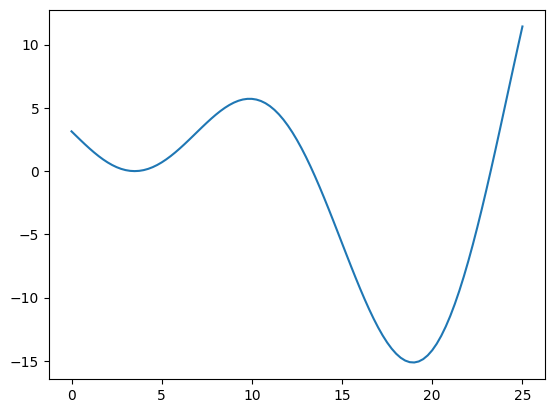
The cell below defines and plots the function.
def xsinx(x):
    return (x - 3.5) * np.sin((x - 3.5) / (np.pi))

bounds = np.array([
    [0, 25]
])

x_valid = np.linspace(0, 25, 101)
y_valid = xsinx(x_valid)

fig, ax = plt.subplots()
ax.plot(x_valid, y_valid)
plt.show()
Starting the optimization#
The easiest way to begin Bayesian optimization is to use the minimize method. Two arguments must be passed:
objective: the function to minimize;design_space: the function boundary.
Because the objective parameter requires a list, we place our objective function within a list. The design_space parameter can accept either a DesignSpace class or a np.ndarray. Providing a np.ndarray will assume the design space is entirely continuous.
Moreover, we can also pass the following optional arguments:
max_iter: the maximum number of iterations before the program stopsdriver_kwargs: kwargs to pass to the optimization driver. In our case, we pass theseedparameter to make this example reproducible.
All minimize parameters can be viewed using: help(minimize). The minimize method returns a State object containing the design of experiment (DoE) with all function samples. We can find the best function value during the optimization process using these samples.
state = minimize([xsinx], bounds, max_iter=12, driver_kwargs={"seed": 0})
          iter         budget           fmin           rscv       fidelity        gp_time       acq_time
             0              5   -6.00738e+00      0.000e+00            nan            nan            nan
             1              6   -6.00738e+00      0.000e+00              1          0.034          0.053
             2              7   -8.17277e+00      0.000e+00              1          0.030          0.051
             3              8   -1.51246e+01      0.000e+00              1          0.033          0.033
             4              9   -1.51251e+01      0.000e+00              1          0.033          0.016
             5             10   -1.51251e+01      0.000e+00              1          0.033          0.014
             6             11   -1.51251e+01      0.000e+00              1          0.037          0.012
             7             12   -1.51251e+01      0.000e+00              1          0.032          0.012
             8             13   -1.51251e+01      0.000e+00              1          0.040          0.015
             9             14   -1.51251e+01      0.000e+00              1          0.039          0.011
          iter         budget           fmin           rscv       fidelity        gp_time       acq_time
            10             15   -1.51251e+01      0.000e+00              1          0.045          0.010
            11             16   -1.51251e+01      0.000e+00              1          0.047          0.010
            12             17   -1.51251e+01      0.000e+00              1          0.058          0.015
We can retrieve the best function sample using the get_best_sample class method. This returns a Sample object containing data such as:
x: the design pointobj: the objective value atxeval_time: the elapsed time to sample the objective.
The Sample object also contains some metadata:
iter: the iteration at which the function was sampledbudget: the budget after sampling the function
By default, one unit of budget is equivalent to one function evaluation.
best_sample = state.get_best_sample()
best_sample
======= sample data =======
x =             [18.93961407]
obj =           [-15.12508715]
cstr =          []
eval_time =     [7.47500053e-06]
------- meta data -------
iter =     4
budget =     9
rscv =     0.0
===========================
Plotting the results#
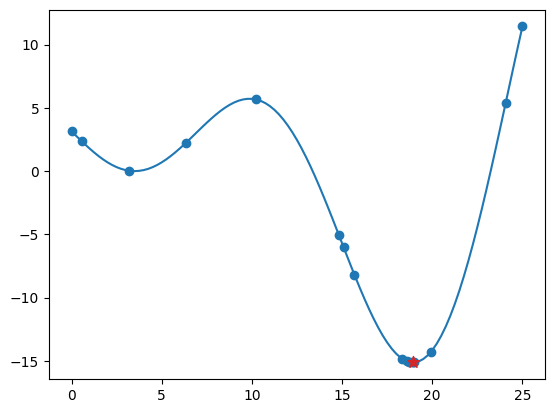
The code snippet below exports all the evaluated design points and their corresponding objective values, plotting them against the function. The best sample is marked with a star.
x_doe = state.dataset.export_as_dict()["x"]
y_doe = state.dataset.export_as_dict()["obj"]

fig, ax = plt.subplots()
ax.plot(x_valid, y_valid)
ax.scatter(x_doe, y_doe)
ax.scatter(best_sample.x[0], best_sample.obj[0], 75, color="C3", marker="*", zorder=30)
plt.show()